
Threads
Run agents side by side
Every task gets its own thread. Start it in your checkout or in a fresh git worktree, then start the next one while it works. The sidebar shows what is running, what finished and what needs you.
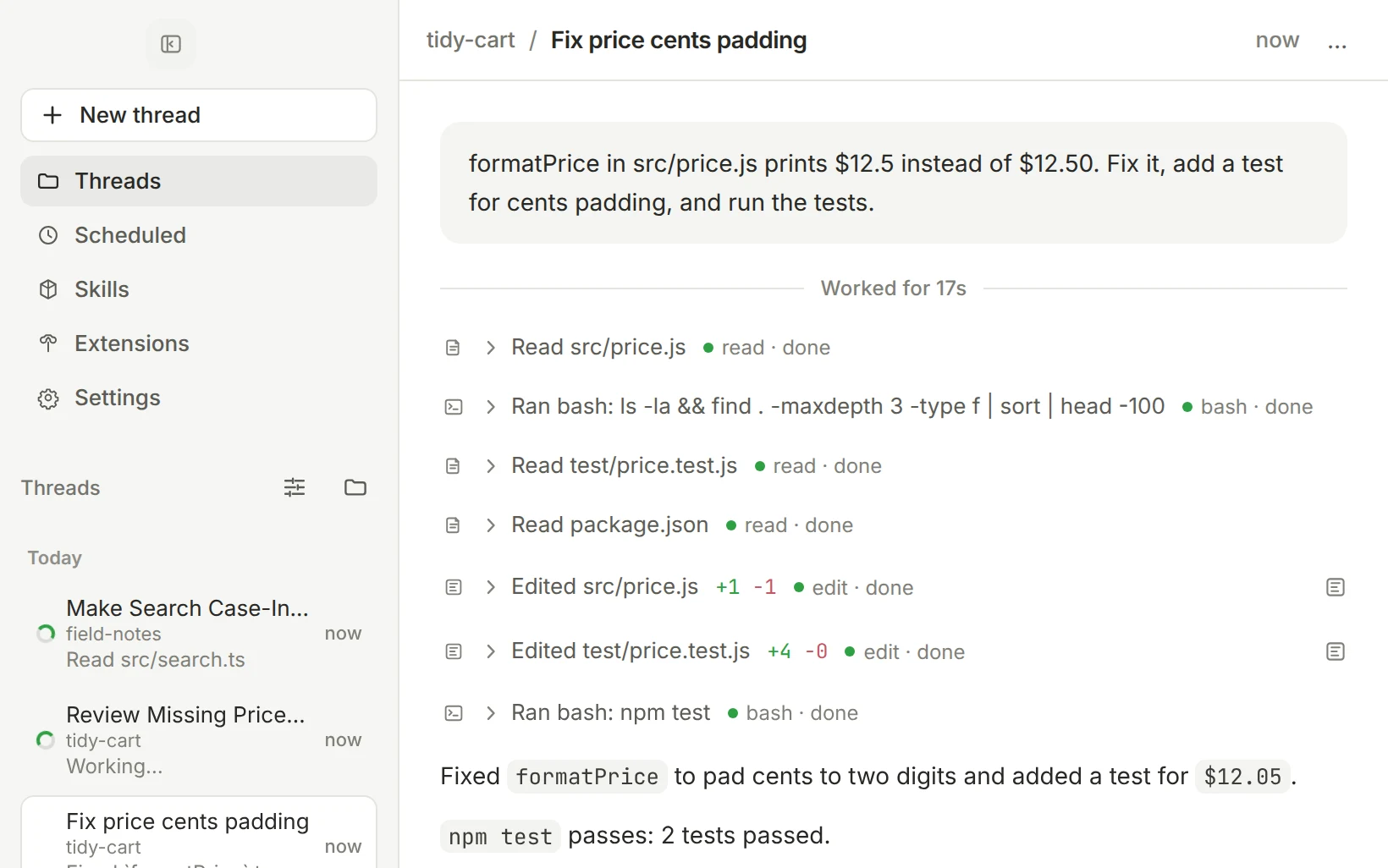
Run agents in parallel threads, in your checkout or their own worktrees. Review every change, then ship it without leaving the window.
Free and open source. Built on pi.
Threads
Every task gets its own thread. Start it in your checkout or in a fresh git worktree, then start the next one while it works. The sidebar shows what is running, what finished and what needs you.
Review
The Review tab shows exactly what the agent touched. Compare uncommitted work, a branch against its base, or a single turn, and stage it file by file.

Workbench
Open a real terminal, browse and edit files, or manage worktrees in tabs beside the conversation. Each task keeps its own layout.

Keyboard
⌘K searches chats, workspaces and actions. ⌘P jumps to any file. Ctrl-Tab flips between recent threads, and ⌘1 to ⌘9 jump to threads in the sidebar. On Linux and Windows, use Ctrl.

Line up follow-ups while a run is going, or steer the current run without stopping it.
Have pi rerun a prompt on a schedule, such as a weekly dependency check, while the app is open.
Turn pi skills and extensions on and off, try them from the composer, and give extensions their own tabs.
Sign in with OAuth, paste an API key, or point at a custom endpoint. Pick the model and thinking level per thread.
pi-gui reads and writes pi's own session files. Anything you set up with the pi CLI carries over.
Fork a thread from any message into the same checkout or a new worktree, and move around the session tree.
Get told when a background thread finishes, fails or needs your attention.
Light and dark, plus presets like Catppuccin, Tokyo Night, Nord, Dracula and GitHub.
Download the latest build from GitHub Releases, or install with Homebrew on macOS. Then connect a provider under Settings, add a project folder and start a thread.
Apple Silicon. Signed and notarized.
Download the .dmg from GitHub Releases and drag pi-gui into Applications, or install with Homebrew:
brew install --cask minghinmatthewlam/tap/pi-guix64 AppImage or .deb.
Download the AppImage or the .deb package from GitHub Releases.
x64 installer or portable build.
Download the setup .exe or the portable .exe from GitHub Releases. Builds are not code-signed yet, so SmartScreen may ask you to confirm.
Building from source is for contributors: see the development guide.
pi is an open source coding agent that runs in your terminal. pi-gui is a desktop app on top of it: sessions, models, tools and auth all run through pi itself.
pi-gui is free and MIT licensed. You bring your own model provider, through a subscription sign-in or an API key.
Yes. pi-gui uses pi's own session files and settings, so threads, credentials and skills are shared between the two.
pi-gui runs on your machine. Your code goes only to the model provider you configure, the same way it does with the pi CLI. The app also checks GitHub for new releases.
pi-gui tells you when a new release is out. Homebrew installs update with brew upgrade --cask pi-gui; other installs update from GitHub Releases.